

Zuck It!
Hide the feed.
Keep the rest.
Stop doomscrolling. Open Facebook or Instagram in Safari and the endless feed is gone: you see what you came for, not what Zuck wants you to see.
Coming soon to the App StoreFor iPhone and iPad. Works in Safari.
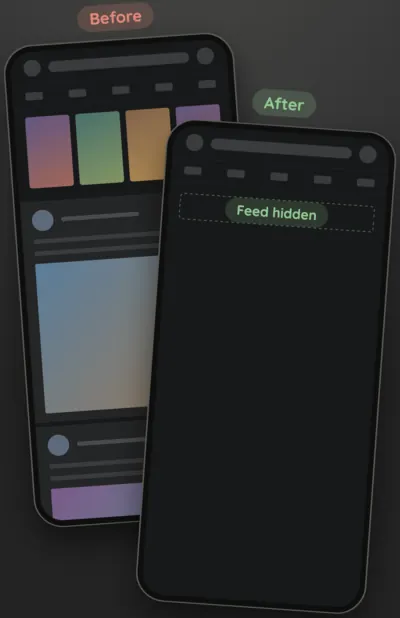
The feed is built to keep you scrolling.
It serves whatever Zuck wants you to see next. Zuck It! takes it away, so you open the site for a message or a group and leave when you are done.
No account. Nothing to log into inside the app. You browse in your normal Safari, logged in as yourself, with nothing sitting in between.
Pick the sites.
Safari hides their feeds.
Zuck It! works on Facebook.com and Instagram.com in Safari. One switch per site, and the endless home feed is gone.
- Facebook.com: the Home feed
- Instagram.com: the posts on the Home page
- Messages
- Groups, profiles and single posts
- Facebook's Feeds tab, Instagram's Reels and Explore
- Everything you open on purpose
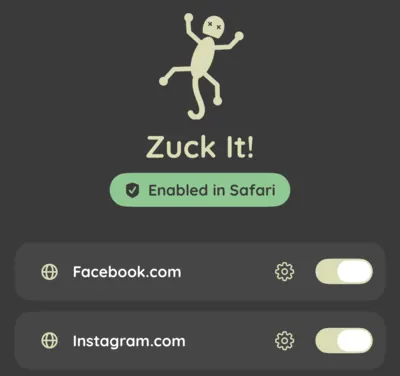
Stories too,
if you like.
Each site has its own options. Switch on Hide stories and the stories tray goes as well. Leave it off and only the feed is hidden.
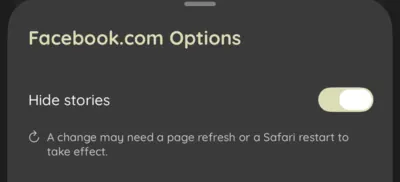
Switch it on
in four taps.
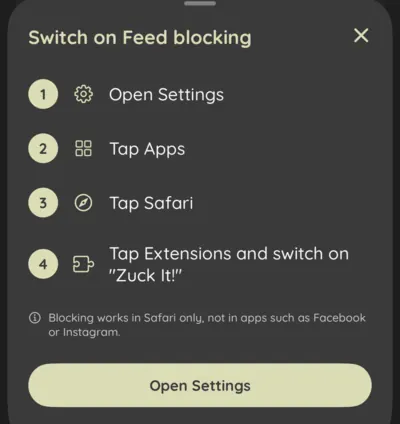
Zuck It! is a Safari content blocker, so you turn it on once in Settings. The app shows you the way: open Settings, tap Apps, tap Safari, then Extensions, and switch on Zuck It!.
It works in the Safari app, not in the Facebook or Instagram apps.
Free and Pro
Start free. Go Pro when you want more than one site at a time.
Free
Hide the feed on one site at a time.
Pro
Hide feeds on several sites at once, and hide stories.
Pro is an auto-renewing subscription for iPhone and iPad, shared with your family through Family Sharing.
Private by design.
Unlike Zuck.
Zuck It! hands Safari a list of page elements to hide. Safari does the hiding, and nothing about the pages you visit ever reaches the app.
- Cannot see what you browseSafari confirms it: the extension has no permission to read or send page content.
- No account, no loginThe app never asks for your name, email, contacts, photos or location.
- No trackingNo advertising ID, and no tracking across apps or websites.
- Anonymous usage, your callAnonymous usage sharing helps improve the app. Switch it off in Settings at any time.
Read the full privacy policy.
Questions
Does it work in the Facebook and Instagram apps?
No. Zuck It! uses Apple's Safari content blocker technology, so it works in the Safari app only. Open the sites in Safari to browse without the feed.
Can I still read my messages and groups?
Yes. Only the endless home feed is hidden, plus the stories tray if you choose. Messages, groups, profiles, single posts and everything you open on purpose stay where they were.
Do I need an account?
No. There is nothing to sign up for. You stay logged in to the sites in Safari as usual.
I switched it on, but I still see the feed.
Reload the page, or close and reopen Safari. A page that was already open keeps the old rules until it reloads. Still stuck? Get in touch.
Which devices does it run on?
iPhone and iPad with iOS 26.2 or later.